Posts

Showing posts with the label Google

Google launches Pixel 4a at price of Rs 29,999 in India

Image
  Google  gets extremely aggressive with the pricing of the newly launched Pixel 4a as well as Nest Audio in India. Ahead of the official release, the tech giant announces the India pricing for the Pixel 4a and Nest Audio smart speaker. The Pixel 4a is launched at Rs 31,999 in the country but Google has set a special price for the phone at Rs 29,999. Globally, the Pixel 4a is priced at $349 (approx Rs 25,673). It’s good to see Google taking the Indian market seriously and pricing the Pixel 4a aggressively in the country. Among the three Pixel phones launched recently, only the Pixel 4a will be available in India, the Pixel 4a 5G and Pixel 5 will not be released. The Pixel 4a comes in just one variant 6GB RAM and 128GB of internal storage. The Google Pixel 4a comes with a 5.8-inch Full HD OLED display with Corning Gorilla Glass 3. The phone offers a standard 60Hz refresh display unlike the Pixel 5. The Pixel 4a is available only in one Just black colour option and incorporates ...
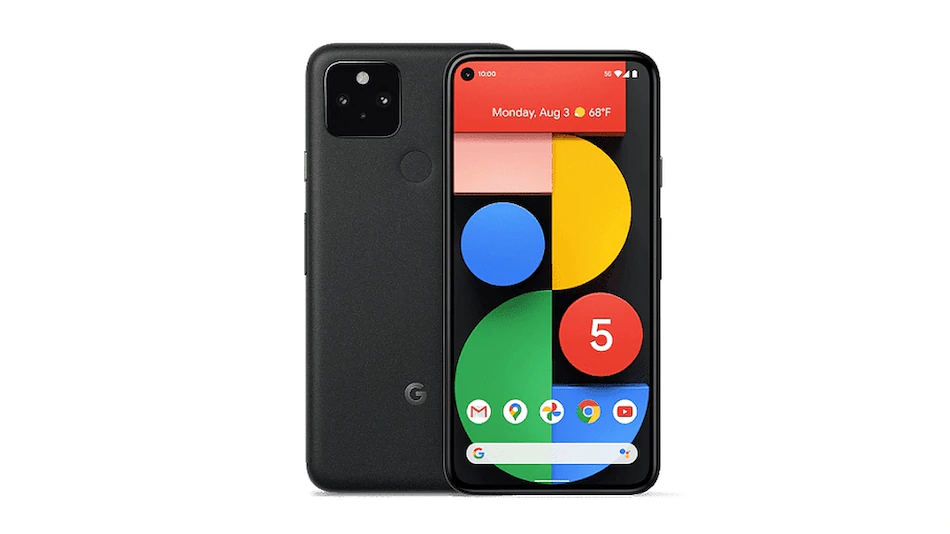
Google Pixel 5, Pixel 4a 5G With Dual Rear Cameras, Snapdragon 765G SoC Launched

Image
Google Pixel 5 has been launched as the tech giant's 2020 flagship phone. The new Pixel phone comes alongside the Pixel 4a 5G that is a 5G version of the Pixel 4a. Both the new smartphones are powered by a Qualcomm Snapdragon 765G SoC and include Titan M security chip. The Pixel 5 and Pixel 4a 5G both come with the same dual rear cameras as well as an 8-megapixel selfie camera and features a hole-punch display design. The company also unveiled a Portrait Light feature and an Extreme Battery Saver mode (with only a small set of active apps) that can increase battery life by up to 48 hours. As a superior option in the lineup, the Pixel 5 features wireless charging support. The smartphone also comes with an aluminium body that is IP68 certified for dust and water resistance.  Google Pixel 5 specifications The dual-SIM (Nano+eSIM) Google Pixel 5 runs on  Android 11  out-of-the-box and features a 6-inch full-HD+ (1,080x2,340 pixels) OLED display with 432ppi pixel d...

Google Pixel 4a with Snapdragon 730G, Punch-hole Display Goes Official for $349

Image
Google Pixel 4a: Specs and Features We’ve already seen the Pixel 4a in numerous leaks until date. It features a matte black finish, complemented by the accented power button, fingerprint sensor, and a square camera module with a single sensor on the rear. On the front, the Google Pixel 4a includes a  5.81-inch Full-HD+ AMOLED  display with a 60Hz refresh rate. The mid-range Pixel’s display does not boast a higher refresh rate like its flagship sibling. The panel has a 19.5:9 aspect ratio and 2340 x 1080 pixels resolution. The highlight here will, however, have to the punch-hole cutout at the top left. Pixel 4a is the first Pixel smartphone with a punch-hole cutout and it houses an 8MP selfie sensor on the front. On the camera front, Google is sticking with a  single 12.2MP (f/1.7) sensor  on the rear – the same as its predecessor. It comes with (Optical Image Stabilization) OIS and EIS in tow as well. The square cutout also includes the LED flash. The mar...

The most interesting new Android 11 features so far

Image
1. Chat Bubbles Chat bubbles first appeared back with  Android Q  beta versions, but Google decided to remove them in the stable release for Android 10. With Android R’s first dev beta, they have made a reappearance with the same concept. Basically, with chat bubbles, messaging apps can show conversations in floating bubbles, similar to Facebook Messenger’s Chat Heads feature that a lot of people like to use. Theoretically, chat bubbles can be used by any messaging app, but as of right now, only the Google Messages and Gmail apps are using the feature. You can open a chat bubble for a conversation by simply long-pressing on a message notification and tapping on ‘Show in chat bubble’. You can then reply to conversations in a floating window similar to Messenger’s implementation, and it even has support for Smart Reply. 2. Conversations With Android 11, Google is also trying to make it easier for users to find their conversation-related notifications in the sea...

Google Pixel 4 with 90Hz Display, Motion Gestures Launch

Image
Google Pixel 4 has been crowned the most leaked smartphone to date and well, you need to backtrack to June to know how it all started. Google  itself outed  what the Pixel 4 would look like four months ago and well, everything about this flagship phone  leaked online  in the time leading up to today’s announcement. Google officially launched the Pixel 4 and 4 XL at the Made by Google hardware event in New York today, basically confirming every hardware spec and feature about its flagship including the price and availability. If you want to know every small detail about Pixel 4 lineup, then look no further as we have listed the entire specs sheet and feature set for both variants down below: Google Pixel 4: Specs and Features No Dual-tone Design With the Pixel 4 lineup, Google is making a significant change in the design front and is swapping out the signature ‘dual-tone’ back panel finish. Both the Pixel 4 and 4 XL now feature a single-color glass panel...

Pixel 3a and 3a XL Launched

Image
Amazon.in Widgets One of the biggest and  highly-anticipated  announcements coming from Google’s developer conference, Google I/O 2019, is that the Pixel 3a and 3a XL has finally gone official. Yeah, Google CEO Sundar Pichai took center stage today during the keynote to take the veil off this mid-range Pixel smartphone, which we had been hearing about and waiting for many months now. Price And Availability Though Google’s intention behind launching a mid-range Pixel was to capture markets like India, the company has completely missed the mark on the pricing front. The Pixel 3a has been priced at a hefty Rs. 39,999 whereas its bigger sibling will retail at Rs. 44,999 for the 4GB and 64GB variant. The pricing of the Pixel 3a for the Indian market is really disappointing. Google is planning to sell more phones in the form of this mid-ranger, but it will find it difficult to court users in India with this pricing. The US pricing of the Pixel 3a is a lot more genero...

10 Best Google Chrome Shortcuts You Should Use in 2019

Image
Amazon.in Widgets 1. Manage Chrome Tabs and Windows There are times when we hurriedly close an important tab and have no idea how to get it back. Well,  you can use Ctrl+Shift+T to bring back the tab in the original state . Similarly, there are shortcuts to efficiently manage tabs and windows without any hassle. We have compiled basic shortcuts below so that you can use on Chrome without losing any time. Open new tab: Ctrl+T Open new window: Ctrl+N Close current tab: Ctrl+W Reopen Closed Tab: Ctrl+Shift+T Close current window: Ctrl+Shift+W Open Incognito Window: Ctrl+Shift+N Switch chrome tabs: Ctrl+Tab Switch chrome tabs on Mac: Cmd+Option+Right or Left arrow Open link in a new tab: Ctrl+Click Open link in a new window: Shift+Click 2. Webpage Shortcuts You hit refresh button but nothing changes? Well, it’s because the webpage is loading the cached content.  You can use Ctrl+Shift+R which refreshes the webpage from scratch  discarding the cached co...

You Can Now Schedule Emails in Gmail

Image
The feature works pretty much how you’d expect it to work. You can write your email whenever you want, and schedule it to be sent at a later date and time of your choosing. This can come in very handy for people looking to send birthday greetings on time, but who keep forgetting. Anyway, here’s how to use the feature on the Gmail app on Android, and on the Gmail web app. How to Schedule Emails in Gmail on Mobile To schedule an email on your smartphone, just follow the steps below. Launch the Gmail app, and compose a new email. Once you’re done with that, tap on the three dot menu on the top right, and tap on ‘ Schedule Send .’ You will now be able to choose between the preset times, or  pick a date and time  of your own choosing by tapping on the last icon. Once you’re done, just tap on ‘ Schedule send ‘ and that’s it. Gmail will schedule your email and it’ll be sent automatically at the time of your choosing. If you want to take a look at your scheduled...

Google Assistant Can Now Read Bedtime Stories on Your Phone

Image
There is good news for parents around the world. If you are not particularly good at reading bedtime stories to your kids, just ask the Google Assistant on your phone to do so and you will be able to hear the famous tales from the Panchtantra or other books. Whether you have an Android or an iOS phone, every time you say  “Hey Google, tell me a story” , the Assistant tells you a tale. If you hear the “Truth Will Never Die” one day, it could be “Don’t be Greedy” next time, or “Don’t Trust Anybody” at some other time. Google introduced the “Tell Me a Story” feature in English in India, Australia, Britain and the US on Thursday. “You’ll need to have  the latest version of Google Play Books for Android or iOS installed to listen to all of these great stories ,” Eric Liu, Product Manager, Google Assistant, wrote in a blog post. “Whether you’re on the way to school drop-off or waiting for soccer practice to start, you can hear stories like ‘Let’s Be Firefighters!’ (B...